
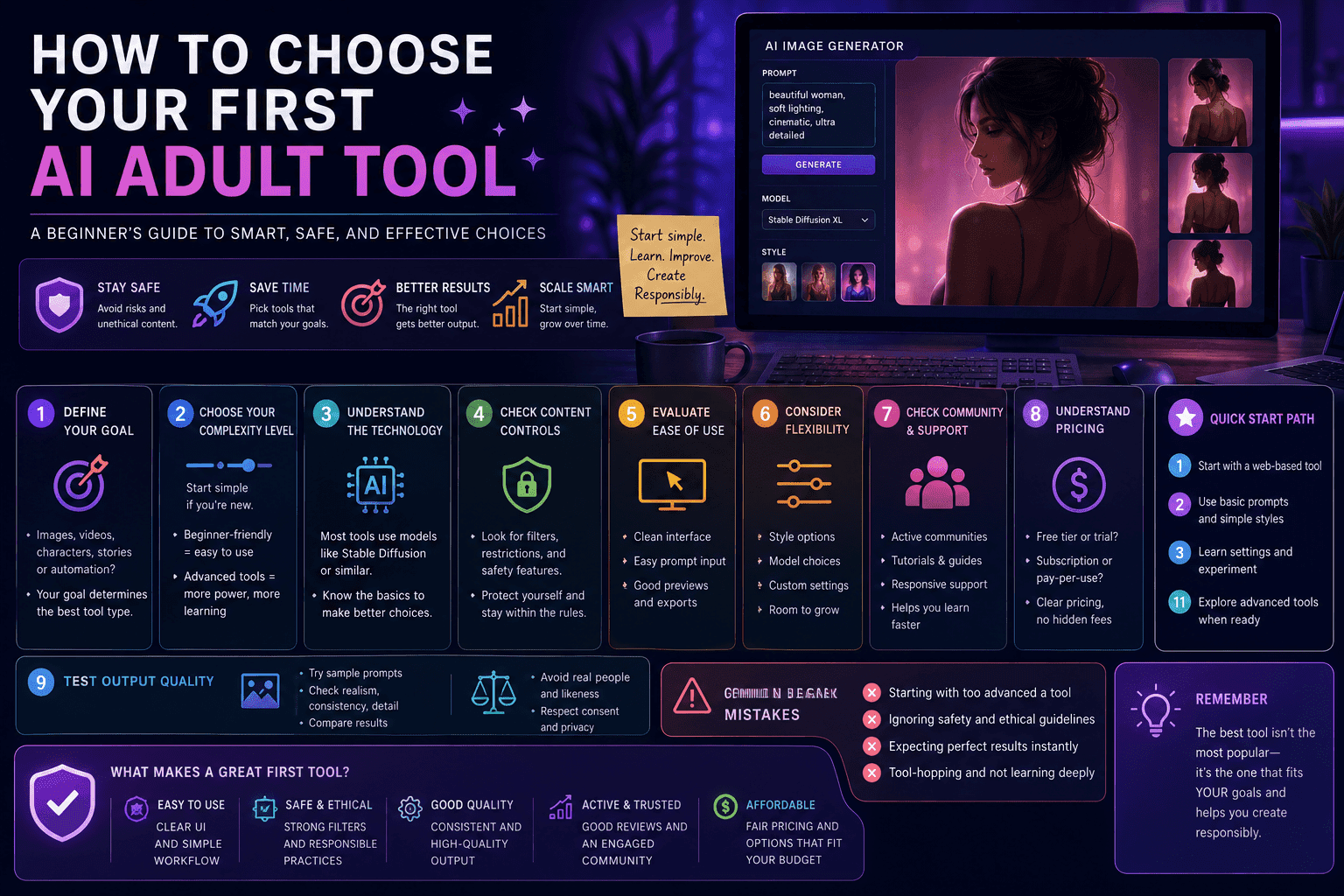
Quick Summary
Choosing your first AI adult tool depends on your goals, technical skill level, and comfort with ethical and legal boundaries. Beginners should focus on safe, beginner-friendly platforms, clear interfaces, and tools built on models like Stable Diffusion, while prioritizing usability, content control, and responsible usage.
Introduction
Here’s the problem:
Most beginners don’t fail because AI is hard.
They fail because they pick the wrong tool first.
Too complex → they quit
Too limited → they get frustrated
Too shady → they regret everything
So instead of randomly downloading things like it’s 2009 LimeWire, let’s do this properly.
1. Define Your Goal First (Or Prepare to Get Lost)
Before choosing any tool, answer this:
What do you actually want to do?
- Generate images?
- Create characters?
- Experiment creatively?
- Build content for a platform?
Why This Matters
Different tools are built for different purposes:
| Goal | Best Tool Type |
|---|---|
| Image creation | Text-to-image generators |
| Story/interaction | AI chat systems |
| Video | AI video tools |
| Scaling content | Automation platforms |
Reality Check
If you don’t define your goal, you’ll:
- Waste time
- Waste money
- Blame the tool
Classic human behavior.
2. Choose Between Beginner-Friendly vs Advanced Tools
This is where most people mess up.
Beginner-Friendly Tools
- Simple interface
- No installation
- Built-in safety systems
Best for:
- First-time users
- Non-technical creators
Advanced Tools
- More control
- Custom models
- Requires setup
Best for:
- Power users
- Developers
- People who enjoy troubleshooting at 2AM
Honest Advice
Start simple.
You can always upgrade later.
You cannot easily recover your sanity after debugging broken installs.
3. Understand the Core Technology
You don’t need a PhD, but you should know the basics.
Most tools are built on:
- Stable Diffusion
- Similar diffusion-based models
Why This Matters
Knowing the base model helps you understand:
- Output quality
- Customization options
- Community support
Translation
If you don’t know what’s under the hood, you won’t know why something works… or doesn’t.
4. Check Content Controls & Safety Features
This is not optional.
Look For
- Content filtering
- Prompt restrictions
- Ethical safeguards
Why It Matters
Good tools help you:
- Avoid illegal content
- Stay within platform rules
- Protect yourself
Red Flag
If a tool has:
- Zero guidelines
- Zero restrictions
- Sketchy branding
That’s not “freedom.”
That’s a liability.
5. Evaluate Ease of Use
If the interface looks like a spaceship dashboard, maybe don’t start there.
Beginner Tools Should Have
- Clean UI
- Simple prompt input
- Preview options
- Easy export
Warning Signs
- Overwhelming controls
- Poor documentation
- Confusing workflows
Reality
If it’s hard to use, you won’t use it.
And then you’ll blame AI instead of your choices.
6. Consider Customization & Flexibility
As you grow, you’ll want more control.
Look For
- Style options
- Prompt flexibility
- Model switching
- Output settings
Balance
Too little control = boring results
Too much control = confusion
You want the middle ground.
7. Check Community & Support
This one is underrated.
Good Tools Have
- Active communities
- Tutorials
- Documentation
- Forums or Discord groups
Why It Matters
When something breaks (it will):
- You need answers
- You need examples
- You need help
Translation
A strong community saves you hours of frustration.
8. Understand Pricing & Costs
Nothing ruins excitement like unexpected bills.
Common Pricing Models
- Free (limited)
- Subscription
- Pay-per-generation
Beginner Advice
Start with:
- Free tiers
- Low-cost plans
Watch Out For
- Hidden fees
- Credit-based traps
- Expensive scaling
Reality
Cheap tools save money… until they waste your time.
9. Evaluate Output Quality
This is where the tool either impresses you or disappoints you.
Look At
- Image clarity
- Consistency
- Realism or style accuracy
Test Before Committing
- Try sample prompts
- Compare outputs
- Check variation quality
Truth
Not all AI tools are equal.
Some look amazing.
Some look like a glitchy fever dream.
10. Ethical & Legal Awareness
Yes, this again. Because it matters.
Always Avoid
- Real individuals
- Non-consensual content
- Misuse of likeness
Why It’s Critical
Ignoring this can lead to:
- Platform bans
- Legal issues
- Reputation damage
Simple Rule
If it feels questionable, it probably is.
11. Best Beginner Tool Setup (Simple Path)
If you want a safe starting point:
Step 1
Use a web-based tool
(No installation headaches)
Step 2
Start with:
- Basic prompts
- Simple styles
Step 3
Learn:
- Prompt structure
- Output control
Step 4
Gradually explore:
- Advanced tools
- Custom models
Translation
Walk before you try to sprint.
12. Common Beginner Mistakes
Let’s save you from yourself.
Mistake 1: Starting Too Advanced
You’re not impressing anyone. You’re just confusing yourself.
Mistake 2: Ignoring Ethics
This is how people get into trouble fast.
Mistake 3: Expecting Perfect Results
AI needs iteration.
First outputs are rarely perfect.
Mistake 4: Tool-Hopping
Switching tools constantly = no progress.
Pick one. Learn it properly.
13. Future-Proofing Your Choice
AI evolves fast.
Choose Tools That
- Update regularly
- Have active development
- Support new features
Why It Matters
Your tool today might be outdated tomorrow.
Welcome to tech.
Final Thoughts
Choosing your first AI adult tool isn’t about finding the “best” one.
It’s about finding the right one for you.
Focus on:
- Simplicity
- Safety
- Learning curve
Then scale up as you improve.
Because in this space, the tool doesn’t make you successful.


